
DTF TRANSFER SIZE GUIDE
DTF Shirt Sizing Guide: Transfer Size Chart & Placement Guide
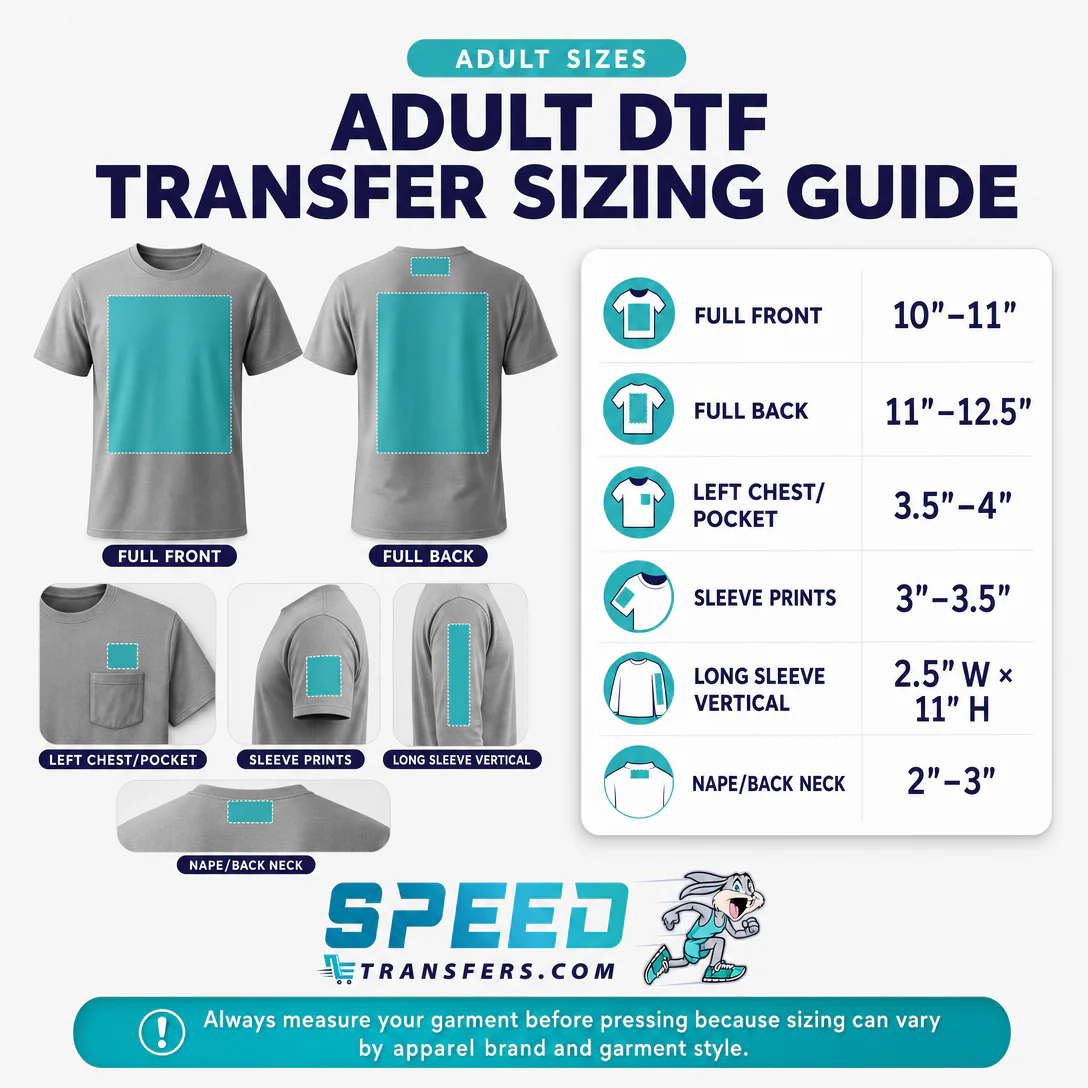
The correct DTF transfer size depends on garment size, print placement, artwork proportions, and the finished look you want. Find starting sizes for adult, youth, toddler and infant garments below, then check the actual garment dimensions before finalizing artwork.
DTF Transfer Size Chart
All general ranges below are preserved from SpeedE’s existing guide. Width is shown unless both width and height are listed. Swipe horizontally on narrow screens.
| Placement | Recommended Size | Best For | Sizing Notes |
|---|---|---|---|
| Full Front | 10–11 in wide | Main artwork on adult shirts | A tall design may need a narrower width to fit its full height. |
| Full Back | 11–12.5 in wide | Large rear graphics | On hoodies, check whether the hood covers the design. |
| Left Chest / Pocket | 3.5–4 in wide | Small adult logos | The original tips also give a broader 3–4 in range; 3.5–4 in is the adult placement chart recommendation. |
| Sleeve | 3–3.5 in wide | Adult short-sleeve graphics | Check sleeve width and avoid seams; youth sleeves use 2–3 in. |
| Long Sleeve Vertical | 2.5 in W × 11 in H | Vertical adult sleeve designs | Check the full design height on the actual sleeve. |
| Back Neck / Nape | 2–3 in wide | Small rear-neck branding | Leave usable clearance from collar seams and labels. |
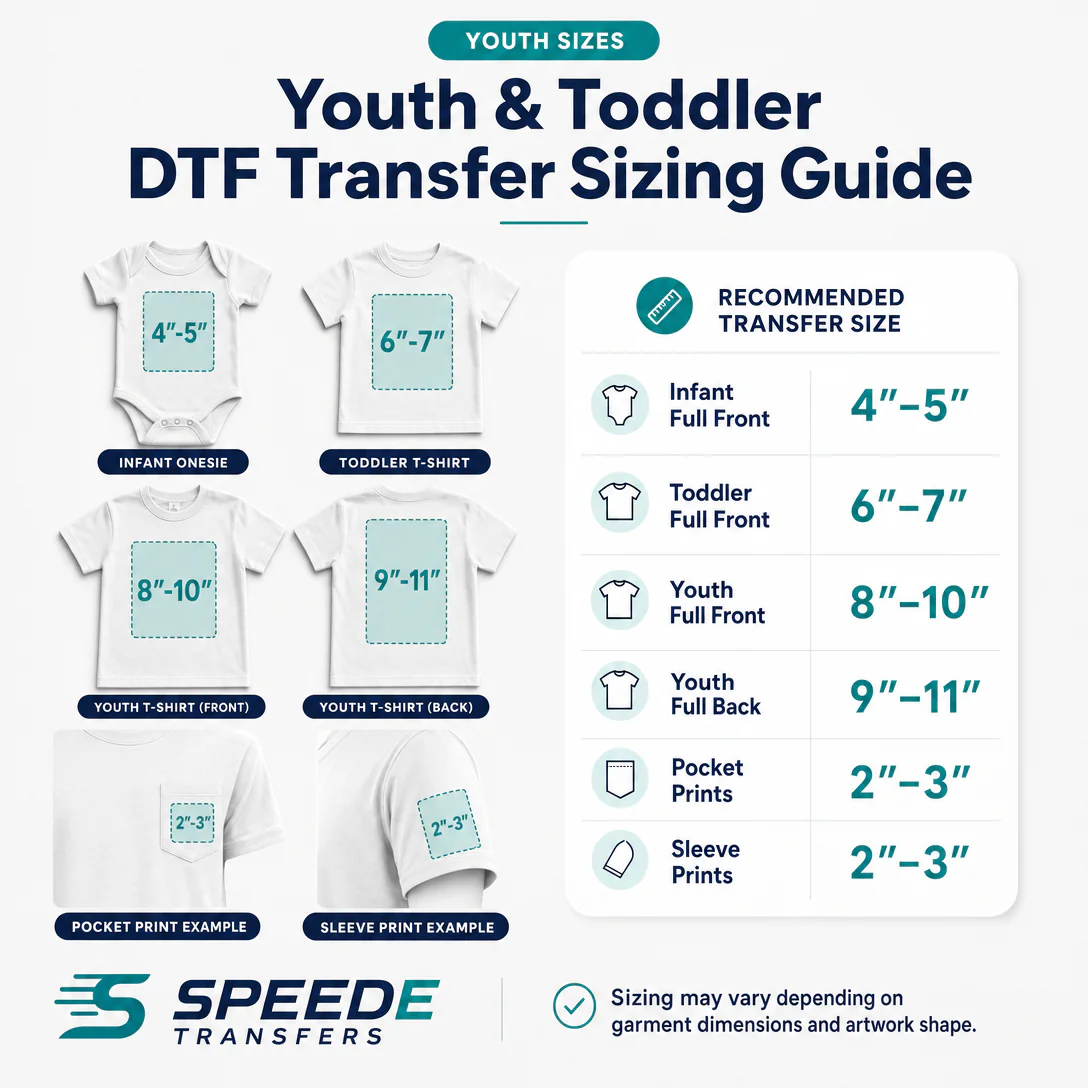
| Infant Full Front | 4–5 in wide | Infant garments | Compare with the age chart below. |
| Toddler Full Front | 6–7 in wide | Toddler garments | The size-specific chart below uses smaller widths for some sizes. |
| Youth Full Front | 8–10 in wide | Youth shirts | The size chart below starts at 7 in for XS. |
| Youth Full Back | 9–11 in wide | Youth rear graphics | Check the back panel width and height. |
| Youth Pocket | 2–3 in wide | Small youth designs | Measure an actual pocket if present. |
| Youth Sleeve | 2–3 in wide | Youth sleeves | Keep clear of seams. |
Adult DTF Transfer Sizes
What size DTF transfer should I use for an adult shirt?
Start at 10–11 in wide for a general adult full-front design. For garment-specific sizing, SpeedE’s existing chart lists XS through 4XL as follows.
Adult suggested print widths
| Garment size | Suggested print width |
|---|---|
| XS | 9 in |
| S | 9.5 in |
| M | 10 in |
| L | 10.5 in |
| XL | 11 in |
| 2XL | 11.5 in |
| 3XL | 12 in |
| 4XL | 13 in |
These widths are not separate full-back or sleeve specifications. Adjust for garment size, cut, placement, design proportions, and style. Oversized apparel may need a different approach; check the usable print area before enlarging.
Youth, Toddler & Infant DTF Transfer Sizes
General full-front ranges are infant 4–5 in, toddler 6–7 in, and youth 8–10 in wide. Keep the original size-specific recommendations below alongside those ranges: they serve different starting references and are not identical.
Infant
| Garment size | Suggested print width |
|---|---|
| 0–3 Mo | 3.5 in |
| 3–6 Mo | 4.5 in |
| 6–9 Mo | 5 in |
| 12 Mo | 5.5 in |
Toddler
| Garment size | Suggested print width |
|---|---|
| 18 Mo | 4.5 in |
| 2T | 5 in |
| 3T | 5.5 in |
| 4T | 6 in |
Youth
| Garment size | Suggested print width |
|---|---|
| XS | 7 in |
| S | 7.5 in |
| M | 8 in |
| L | 8.5 in |
| XL | 9 in |
Youth full back: 9–11 in wide. Youth pocket and sleeve prints: 2–3 in wide. For school, team, or children’s apparel orders, measure the smallest garment and review whether separate artwork sizes are needed.
DTF Transfer Placement Guide
What size should a full front DTF transfer be?
10–11 in wide is SpeedE’s adult starting recommendation.
Typical use: Main artwork on adult shirts.
Placement: Center on the garment body; check neckline and hem clearance.
A tall design may need a narrower width to fit its full height.
What size should a full back DTF transfer be?
11–12.5 in wide is SpeedE’s adult starting recommendation.
Typical use: Large rear graphics.
Placement: Center on the back panel and check the neckline.
On hoodies, check whether the hood covers the design.
What size should a left chest / pocket DTF transfer be?
3.5–4 in wide is SpeedE’s adult starting recommendation.
Typical use: Small adult logos.
Placement: Use the wearer’s left chest and check any actual pocket.
The original tips also give a broader 3–4 in range; 3.5–4 in is the adult placement chart recommendation.
What size should a sleeve DTF transfer be?
3–3.5 in wide is SpeedE’s adult starting recommendation.
Typical use: Adult short-sleeve graphics.
Placement: Center in the usable sleeve panel.
Check sleeve width and avoid seams; youth sleeves use 2–3 in.
What size should a long sleeve vertical DTF transfer be?
2.5 in W × 11 in H is SpeedE’s adult starting recommendation.
Typical use: Vertical adult sleeve designs.
Placement: Align along the sleeve, away from seams and the cuff.
Check the full design height on the actual sleeve.
What size should a back neck / nape DTF transfer be?
2–3 in wide is SpeedE’s adult starting recommendation.
Typical use: Small rear-neck branding.
Placement: Center below the back neckline.
Leave usable clearance from collar seams and labels.
How to Measure a Shirt for a DTF Transfer
Measure the usable width and height at the intended location, then fit the visible artwork inside that area. The shirt’s label size alone does not define the print area.
- Lay the shirt flat and smooth out folds without stretching the fabric.
- Identify the intended print location: front, back, left chest, sleeve, or nape.
- Measure the usable width and height, leaving room around seams, collar, pockets, and garment edges.
- Determine the desired visible print width using the relevant chart as a starting point.
- Consider the garment size and cut; compare fitted, standard, and oversized garments.
- Check artwork proportions with the aspect ratio locked.
- Set the final artwork dimensions in inches and confirm that the resulting height fits.
- Review a full-size paper layout or mockup and check the final gang sheet dimensions before ordering.
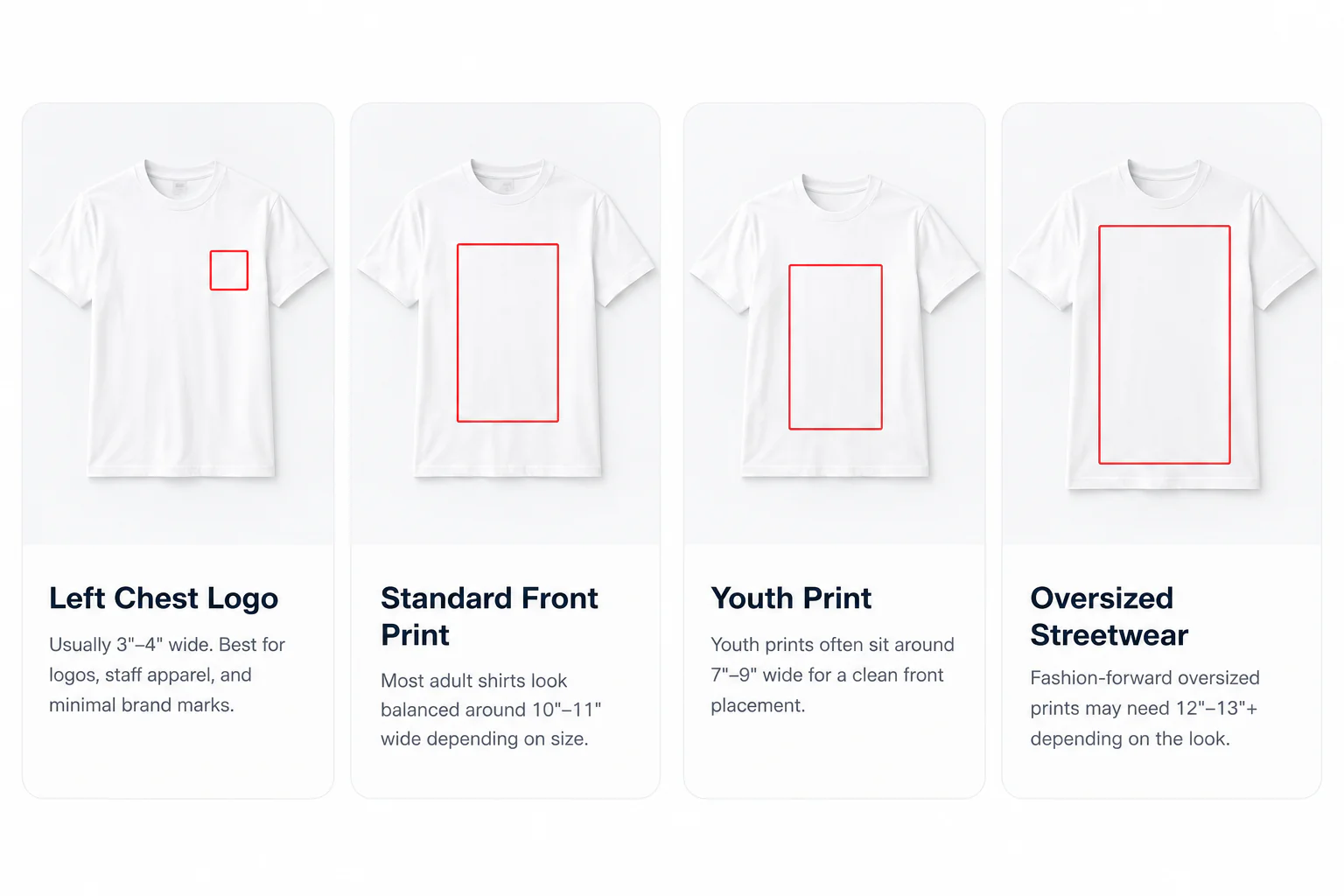
Diagram is not to scale. Left chest means the wearer’s left, shown on the viewer’s right.
How Big Should a DTF Transfer Be?
There is no single universal DTF transfer size. For common full-front placements, SpeedE starts at adult 10–11 in, youth 8–10 in, toddler 6–7 in, and infant 4–5 in wide.
| Garment group | General full-front width |
|---|---|
| Adult | 10–11 in |
| Youth | 8–10 in |
| Toddler | 6–7 in |
| Infant | 4–5 in |
Use the garment-specific charts for finer comparisons. Placement, artwork shape, proportions, and intended style can change the final DTF print size.
Oversized DTF Transfer Sizing
Choose an oversized print by measuring the garment and checking its visual balance; there is no universal oversized size. Larger garments can accommodate larger artwork, while XS and smaller garments may need a reduced design.
SpeedE’s original advice notes that streetwear and fashion fits can require larger dimensions and that 2XL–5XL garments may need resizing. The detailed chart provides widths only through 4XL; it does not specify a 5XL number. Consider seams, garment edges, and the artwork’s height before enlarging.
The original tip “When unsure, size up” reflects a preference for a slightly larger print over one that feels too small. Apply that preference only after confirming that the larger design fits the usable area.
How Artwork Shape Affects Transfer Size
A 10-inch-wide design can look very different depending on its shape and visible artwork. Compare the actual printed marks rather than just the canvas dimensions.
- Horizontal designs: wide text can have little height, so check readability and balance.
- Vertical designs: the height may exceed usable space even when the width fits.
- Square artwork: equal width and height can fill more area than a narrow wordmark.
- Logos and illustrations: dense shapes may look heavier than fine outlines at the same width.
- Transparent space: empty margins can make the visible artwork smaller than the file dimensions suggest.
- Aspect ratio: preserve proportions. For a 2:1 design, 10 in wide produces a 5 in height; stretching either dimension distorts the artwork.
DTF Artwork Preparation
Prepare high-resolution artwork at the final print dimensions. SpeedE’s existing guide recommends transparent PNGs and 300 DPI to avoid unwanted background boxes and preserve detail.
- Use a transparent background where you do not want a printed background.
- Set the exact final width and height before uploading.
- Use high-resolution originals; enlarging tiny artwork can produce blurred or rough edges.
- Review visible artwork, transparency, dimensions, and gang sheet layout before ordering.
Read the DTF artwork requirements and smaller-artwork considerations for further guidance. Check the DTF color chart when preparing color choices, and follow the current DTF pressing instructions when applying transfers.
Common DTF Sizing Mistakes
- Using one width for every shirt: Compare the smallest and largest garments and resize when needed.
- Making a left chest print too large: Start with the left-chest range rather than a full-front width.
- Making a sleeve print too wide: Measure the sleeve panel and check seams.
- Ignoring artwork proportions: Check both width and height with the aspect ratio locked.
- Failing to measure the garment: Label sizes vary by brand and cut.
- Using low-resolution artwork: Start with a clean, high-resolution source.
- Enlarging poor-quality artwork: Stretching a small image does not recover missing detail.
- Forgetting oversized styles: Review the actual garment fit and intended visual scale.
- Placing artwork too close to seams: Keep the full design inside the usable panel.
- Failing to check final dimensions: Confirm the artwork and gang sheet layout before ordering.
DTF Sizing Quick Reference
General placement recommendations • Width unless W × H is shown • Measure your actual garment.
ADULT
- Full Front — 10–11 in wide
- Full Back — 11–12.5 in wide
- Left Chest / Pocket — 3.5–4 in wide
- Sleeve — 3–3.5 in wide
- Long Sleeve Vertical — 2.5 in W × 11 in H
- Back Neck / Nape — 2–3 in wide
YOUTH
- Full Front — 8–10 in wide
- Full Back — 9–11 in wide
- Pocket — 2–3 in wide
- Sleeve — 2–3 in wide
INFANT / TODDLER
- Infant Full Front — 4–5 in wide
- Toddler Full Front — 6–7 in wide
For age- and size-specific widths, use the adult and children’s charts above. Those existing recommendations differ from some general ranges.
Accessory & Hat DTF Transfer Sizes
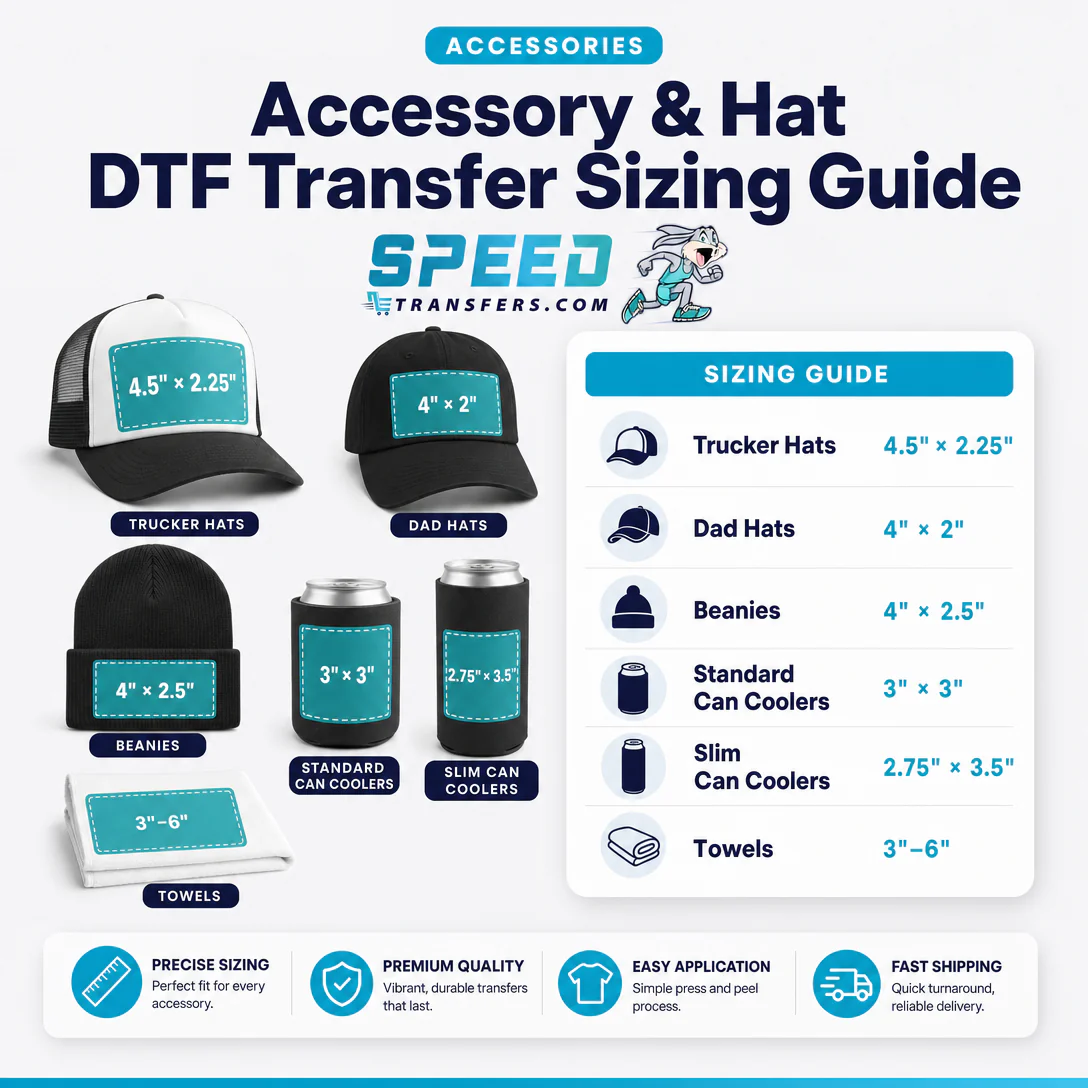
These useful accessory measurements are retained from SpeedE’s original guide. Check the actual print panel and available pressing surface.
| Accessory | Recommended size |
|---|---|
| Trucker Hats | 4.5 × 2.25 in |
| Dad Hats | 4 × 2 in |
| Beanies | 4 × 2.5 in |
| Standard Can Coolers | 3 × 3 in |
| Slim Can Coolers | 2.75 × 3.5 in |
| Towels | 3–6 in |
Frequently Asked Questions About DTF Transfer Sizing
What size DTF transfer should I use for an adult shirt?
Start with 10–11 inches wide for an adult full-front print. SpeedE’s garment-specific chart ranges from 9 inches for XS to 13 inches for 4XL, so the general placement range is not a limit for every shirt. Measure the actual garment and adjust for its cut, the artwork’s height, and the finished look.
What size DTF transfer should I use for a youth shirt?
SpeedE recommends 8–10 inches wide for youth full-front prints and 9–11 inches for youth full-back prints. Its garment-specific youth widths are XS 7, S 7.5, M 8, L 8.5, and XL 9 inches. Keep both references in mind and use the actual shirt dimensions to choose a balanced size.
What size should a left chest DTF transfer be?
Use 3.5–4 inches wide as the adult left-chest or pocket starting point in SpeedE’s placement chart. The existing general tips also mention 3–4 inches, while youth pocket prints use 2–3 inches. Check the visible logo, garment cut, and any pocket before ordering; a wide logo can feel larger than a compact mark.
What size should a full back DTF transfer be?
Start with 11–12.5 inches wide for an adult full-back DTF transfer, or 9–11 inches for a youth full-back transfer. Measure the back panel and check the design height as well as its width. On hoodies, consider how the hood falls over the artwork and keep the design clear of seams.
How big should a sleeve DTF transfer be?
Use 3–3.5 inches wide for adult sleeve prints and 2–3 inches for youth sleeves. For an adult vertical long-sleeve design, SpeedE lists 2.5 inches wide by 11 inches high. Its original FAQ combines sleeve options as 2–3.5 inches. Measure the intended sleeve panel because taper, seams, and cuffs affect usable space.
What size DTF transfer should I use for toddler shirts?
SpeedE’s general toddler full-front recommendation is 6–7 inches wide. Its separate garment chart lists 18 Mo at 4.5 inches, 2T at 5 inches, 3T at 5.5 inches, and 4T at 6 inches. These are different starting references rather than interchangeable rules. Measure the toddler shirt before setting final artwork dimensions.
Can I use the same transfer size for every shirt?
A single transfer size can work across some similar garments, but it will not look equally balanced on every shirt. Compare the smallest and largest garments in the order. Larger sizes, including the original guide’s 2XL–5XL example, may need larger artwork; small shirts and fitted cuts may require reduced dimensions.
How do I measure a shirt for a DTF transfer?
Lay the shirt flat and identify the intended print location. Measure the usable width and height, keeping clear of seams, neckline, and garment edges. Choose the desired visible print width, then calculate height using the artwork’s proportions. Compare the result with the relevant SpeedE chart and review a full-size layout before ordering.
What resolution should DTF artwork be?
SpeedE’s existing guide recommends 300 DPI artwork at the intended print dimensions. A transparent PNG helps avoid unwanted background boxes. Check the original file quality before enlarging it: changing a resolution setting or stretching a tiny image does not restore missing detail. Review the dedicated artwork requirements before preparing the final upload.
Should my artwork be created at the final print size?
Yes. Set the artwork to the final width and height you want printed, as SpeedE’s existing guide recommends. Keep the aspect ratio locked and check the visible design bounds rather than relying only on the canvas size. Review dimensions in the gang sheet layout before ordering so placement and scale match your garment.
Helpful DTF Links
For production-focused, wholesale, and print-shop placement guidance, visit the existing Merchant DTF sizing guide. You can also review the ordering and artwork FAQ. The previous PDF download currently returns a missing-file response; its original URL is recorded in the audit for repair.
Ready to Order Your DTF Transfers?
Now that you know your desired transfer size, prepare your artwork and place your order with SpeedE Transfers. For DTF transfers in Austin, choose the existing gang sheet builder or upload your finished gang sheet at the dimensions you want printed.