
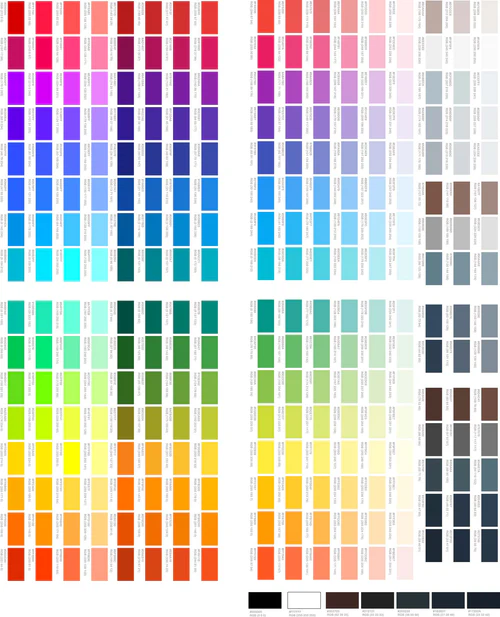

DTF Color Matching Guide – 1,080 Color Swatches for DTF Printing
$10.00
You save
DTF Color Matching Guide for DTF Printers – 1,080 Color Swatches
NOTE: This is the SpeedETransfers DTF Color Matching Guide for DTF printers only. Get accurate and consistent color results using the same proven color-matching system we’ve used at SpeedETransfers for over 3 years.
Our DTF Color Matching Guide and DTF color chart is designed specifically for DTF printing on black shirts. The downloadable file includes 1,080 DTF color swatches arranged in a clean, easy-to-use grid layout, giving you a practical color reference for choosing and matching colors for DTF transfers.
Use real printed DTF color samples to help your customers choose colors before production, helping reduce color mismatches, unnecessary reprints, and color-selection guesswork.
✅ What’s Included
High-resolution downloadable DTF color chart
1,080 DTF color swatches
Easy-to-use color grid layout
HEX color codes for color selection and matching
Updated with SpeedETransfers branding only
Clean layout designed for easy cutting and use
Digital file ready to download and print with your DTF printer
🖨️ How the DTF Color Matching Guide Works
Using the SpeedETransfers DTF Color Matching Guide is simple.
1. Download the file
After your payment is successfully completed, you’ll receive access to the downloadable DTF color chart.
2. Print the color chart
Open the file and print it using your DTF printer and your normal DTF printing workflow.
3. Press the color chart onto a black shirt
Apply the printed DTF color chart to a black shirt so you can see the actual printed colors.
4. Let your customers choose their color
Have customers view the real printed DTF color samples and select the color that best matches what they want.
5. Use the HEX code
Once the customer selects a color, simply use the corresponding HEX code in their design for consistent color selection and DTF color matching.
🎯 Why Use a DTF Color Matching Chart?
Choosing colors from a computer monitor or phone screen can make it difficult to know exactly how a color will appear after DTF printing.
A physical DTF color chart gives you a real printed reference that you can use when working with customers and preparing DTF transfer artwork.
The SpeedETransfers DTF color guide can help you:
Create a more consistent DTF color-matching workflow
Give customers real printed color samples to choose from
Reduce color-selection guesswork
Help reduce unnecessary color-related reprints
Reference colors when preparing DTF transfer artwork
Make customer color selection easier
Create a reusable color reference for your DTF printing business
🎨 DTF Color Swatches With HEX Codes
The guide includes 1,080 DTF color swatches with corresponding HEX color references.
This makes it easier to identify a selected color and use the corresponding HEX value when preparing artwork for DTF transfers, custom shirts, apparel printing, and other DTF printing projects.
Instead of asking a customer to choose a color based only on what they see on a computer screen, you can show them your actual printed DTF color samples.
👕 Designed for DTF Printing on Black Shirts
The SpeedETransfers DTF color chart is designed for black shirts.
Print the downloadable color guide with your DTF printer, press the color chart onto a black garment, and use the finished print as your physical DTF color reference chart.
Because DTF printing results can vary depending on the printer, ink, transfer film, RIP settings, white-ink settings, garment, and other production conditions, use the printed chart as a reference for your own DTF printing workflow.
🖨️ DTF Printer Color Matching Guide
This downloadable color matching guide is made for businesses using DTF printers and DTF transfers.
It can be useful for:
DTF printing businesses
DTF transfer companies
Custom T-shirt businesses
Apparel printing companies
Print shops
Clothing brands
Apparel decorators
Custom apparel businesses
Etsy sellers
Small clothing businesses
Businesses producing custom DTF transfers
Whether you’re printing custom shirts, logos, apparel designs, business uniforms, or other DTF transfers, having a consistent color reference can make customer color selection easier.
📥 Digital DTF Color Chart Download
This is a digital download. No physical product will be shipped.
Once your payment is successfully completed, you’ll receive access to download the SpeedETransfers DTF Color Matching Guide.
Download the file, print it using your own DTF printer, and create your own physical DTF color reference chart.
Start Matching Your DTF Colors
Get the SpeedETransfers DTF Color Matching Guide with 1,080 DTF color swatches and HEX color references and create a simple, repeatable color-selection process for your DTF printing business.
Description
Additional information
| Type(Download, Print only) | Downloadable, Print |
|---|
Only logged in customers who have purchased this product may leave a review.
Related products
-

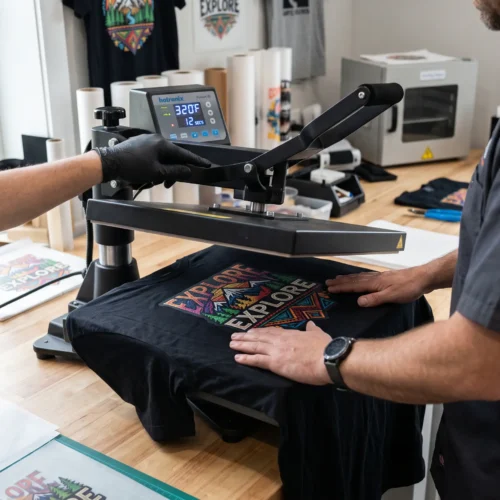
DTF Shirt Pressing Service
Price range: $3.00 through $5.00
You save Select options This product has multiple variants. The options may be chosen on the product page -
Mesh Banner Printing
$0.00 Add to cart -
DTF CMYK + RGBO Builder
Price range: $12.00 through $220.00
You save Select options This product has multiple variants. The options may be chosen on the product page -
CMYK Ink
$40.00 Add to cart
Reviews
There are no reviews yet.